Want to get a (HD/4K) Video Converter with only $9.9? Want to get a Blu-ray/DVD tool with up to 50% coupons? Pavtube Facebook Christmas Lowest Promotion is providing an absolute surprise for you! Here you can find out the best deals.  The discount offering is to show gratitude to valued customers and potential users of Pavtube software, so we Roll out Christmas Sales with 50% ~ 55% Discount for top-selling Blu-ray/DVD rippers, Video Editor andOnly $9.9 Video converters as well as $9.9 DVD Creator for Windows/Mac users, which can help you move favorite Blu-ray/DVD movies or convert digital videos to any home devices and edit & burn videos to DVD for home use! Pavtube products can also assist you to creat special timeless memories for this year's Christmas. 50% ~ 55% Discount for top-selling Blu-ray/DVD rippers, Video Editor: Top 1. 55% OFF Media Magician for Windows/Mac


 Learn more about the software Top 2. 50% OFF Video Converter Ultimate for Windows/Mac Learn more about the software Top 3. 50% OFF ByteCopy for Windows/Mac Learn more about the software Top 4. 50% OFF BDMagic for Windows/Mac Learn more about the software Top 5. 50% OFF DVDAid for Windows/Mac Learn more about the software Only $9.9 Video converters and $9.9 DVD Creator - Up to 78% Coupons: Top 1. $ 9.9 Video Converter for Windows/Mac Learn more about the software Top 2. $ 9.9 HD Video Converter for Windows/Mac Learn more about the software Top 3. $ 9.9 DVD Creator for Windows/Mac Learn more about the software Top 4. $ 9.9 MXF Converter for Windows/Mac Learn more about the software Top 5. $ 9.9 MTS/M2TS Converter for Windows/Mac Learn more about the software Top 6. $ 9.9 MXF MultiMixer / iMixMXF Learn more about the software Top 7. $ 9.9 MKV Converter for Windows/Mac Learn more about the software Top 8. $ 9.9 FLV/F4V Converter for Windows/Mac Learn more about the software What can Pavtube do? 1) 1:1 Backup Blu-ray/DVD without region code or protection limit in two clicks. 2) Rip Blu-ray/DVD into H.265/HEVC, M3U8, MP4, Apple ProRes, DNxHD, MOV, M4V, MOV, MKV, AVI, Xvid, Divx, VOB, MPEG-2, SWF, FLV... for playback on smartphone, tablet, TV set, HD media player, streaming server, Hard drive, Game console, or edit in Final Cut Pro, iMovie, Adobe Premiere Pro, Avid Media Composer, etc. 3) Edit and Convert Canon/Sony/Panasonic/GoPro/Samsung/Nikon/JVC/Blackmagic/Red One shooted H.265, XAVC, XAVC S/L, MXF, MOV, AVCHD, AVI, MP4, VOB footages into common video formats, so you can watch or edit them on PC/Mac. 4) Help you Burn DVD folder/ISO image/various video formats to DVD on Windows/Mac. More Christmas Topiscs 1. Watch Christmas Movies on iPad Pro: A comprehensive solution are offered for you to transfer and watch Blu-ray/DVD/Online downloaded Christmas movies on iPad Pro. Youtube Video: https://www.youtube.com/watch?v=32X56tzKVQU 2. Watch Christmas Decoration Video: A comprehensive solution to transfer and play Christmas decoration video on computer, mobile devices, game consoles or TV, etc. Youtube Video: https://www.youtube.com/watch?v=zekTsVJEJTI 3. Upload Christmas Video on YouTube: It is likely that you will record all the funny moments happened on Christmas with your HD camera, smartphone or tablet. If you want to upload and share your Christmas video to YouTube, Facebook or Vimeo, here is a solution. 4. Burn Christmas Video to DVD: Whether the Christmas videos are shot or downloaded, the fact remains that you have to use a high quality player preferably a DVD player so you comfortably sit and watch your awesome Christmas videos with your loved ones. For quality viewing, you have to burn Christmas videos to DVD. 5. Stream Christmas Movies on Apple TV 4: For Apple users who have just got a new Apple TV, have you ever imaged of streaming your favorite Christmas movies to Apple TV for watching via large screen HD TV? Youtube Video: https://www.youtube.com/watch?v=9tjnWHEB9sI 6. Edit Christmas Video with FCP: When the shooting stage is over, you can do some professional post production work of your Christmas video footage with FCP or FCP X before sharing them with others. However, you may face the challenge to import and edit Christmas video due to the format incompatible issues, this article will show you how to solve. Youtube Video: https://www.youtube.com/watch?v=t5puE0yQeXg 7. Backup BD/DVD Christmas Movie Collection: If you happen have a lot Christmas movies either classic or newly purchased ones on Blu-ray/DVD disc, it is very essential for you to make a copy or backup of them before your precious Christmas movie collection get scratched, lost, stolen, or otherwise useless. Youtube Video: https://www.youtube.com/watch?v=7esfbre816g ...... Thanks for reading about this Pavtube Facebook Christmas promotion idea, we have lots more great articles and videos, check them out! Expire on Jan 31, 2016. More Enjoy Sony HDR-TD10 3D MTS/M2TS on Zeiss VR One with iPhone 6 iTunes H.265 Solution- Convert H.265 video to iTunes library Comprehensive Methods to Rip DVD to VLC Backup iTunes Movies to Galaxy S6/S6 Edge for playback Play 1080p MKV movie with subtitles on Samsung TV via Plex Best 4K UHD Video Converter & Compressor Also a 4K Player Watch 3D Blu-ray media with BenQ W1070 DLP projector Christmas Sales: 50% OFF Blu-ray/DVD/Video Tools – Pavtube 2015
Summary:This tutorial will show you how you can enjoy Blu-ray movies on you Samsung Galaxy NotePro 12.2. With the best Mac Galaxy Blu-ray Ripper, you will be able to convert Blu-ray to NotePro 12.2 supported MP4 video format on Mac easily and fastly. About Compelling Samsung Galaxy NotePro 12.2 CES 2014 is fast approaching, and our eyes will certainly be peeled for any news coming from Samsung's camp during the event. Samsung's lineup of tablets now extends from 7 inches to 12.2 inches, the main attraction of the Galaxy Note Pro is obviously its 2560x1600-pixel 12.2-inch screen. Whether you're watching a performance or creating a presentation, do it all with the GALAXY NotePRO. The 12.2" WQXGA (2560 x 1600) display means more of everything; more colour, more information and more detail. This versatile screen allows you to "flip" through digital magazines, review detailed work documents or enjoy your favourite movies with dual speakers. Equipped with these features, Galaxy NotePro 12.2 cannot be more appropriate to play videos with flawless and crystal effect on the go. Difficulties in Playing Blu-ray on Samsung Galaxy NotePro 12.2 Admittedly, although it's terrific to play videos thereon, it has its black spot that it cannot play Blu-rays. Since there is no Blu-ray drive on Samsung Galaxy NotePro 12.2, you cannot insert Blu-ray to it. So to enjoy Blu-ray movies on Galaxy NotePro 12.2, first you need to find a perfect application for ripping/converting Blu-ray to NotePro 12.2 supported format. Helper to Convert Blu-ray to Samsung Galaxy NotePro 12.2 on Mac Easily No worries; To accomplish the job, this top Blu-ray to Galaxy NotePro Ripper for Mac from Pavtube for ripping and converting Blu-ray movies to Galaxy NotePro 12.2 MP4 on Mac with ease. With clean and simple interface, fast conversion speed and perfect video quality, it will become your most reliable Blu-ray Ripping tool on Mac. This article will give you the Mac solution for get movies from Blu-ray disc onto Galaxy NotePro 12.2 for playback, if you are a Windows user, try Pavtube Blu-ray Ripper and refer to the steps here. No matter you are a novice or an experienced expert, this straightforward program can aid you to convert Blu-ray to Samsung Galaxy NotePro 12.2 easily just in three steps. NOTE: You need to get an external Blu-ray drive to make your Windows/Mac recognize Blu-rays. Most the built-in drives are only for DVDs. Step 1. Download, install and run Blu-ray Ripper for Mac, as the Mac Blu-ray to Galaxy NotePro Converter. Click "Load Files" to import Blu-ray. It will recognize Blu-ray discs from ROM, Blu-ray ISO/IFO and Blu-ray folders automatically. (View ISO/IFO file on Galaxy Note Pro 12.2) Step 2. Choose Samsung Galaxy NotePro 12.2 compatible format. Click "Format" drop-down list to locate all the profile; choose "Samsung -> Samsung Galaxy Note(*.mp4)" as the most compatible format for Galaxy NotePro 12.2. Tips: If you want to rip Blu-ray to for Galaxy NotePro 12.2 with multiple audio tracks and subtitles, Bytecopy for Mac/ByteCopy will help you with special multiple track MP4 profiles. Choose "Multi-track MP4 (*.mp4)" from "Multi-track Video". Now Pavtube ByteCopy for Win/Mac giveaway is starting from April 19, and the promotion starts at 8:00 in the morning GMT/London time and lasts for 48 hours. Never miss!!! Step 3. Customize video specs.(Optional) Click "Settings" to set up video size, frame rate, bitrate and other settings. Tips: If you think the video size and image quality are not suitable for your Samsung smartphone, you can first choose any one of the provided types, then change the settings. Please remember the file size is based more on bitrate than resolution which means bitrate higher results in bigger file size, and lower visible quality loss. Step 4. Start the Blu-ray to Galaxy NotePro conversion on Mac. Now hit to big "Convert" button to start the Blu-ray to Galaxy NotePro MP4 converting on Mac. Wait for some moments, then click "Open output folder" to quick locate the converted MP4 file and transfer to to Galaxy Note Pro12.2 for playing easily.
Tip for editing Blu-ray movies: Pavtube Blu-ray Ripper for Mac could edit videos by trimming, cropping, splitting video, add text/image/video watermark as copyright protection, and attach external *.srt, *.ass, or *.ssa subtitles into source media for entertainment. Click the "Edit" button and edit your movies before conversion. Trim: Select video durations by setting the start time and the end time. Crop: Cut off black edges and unwanted areas. Text Watermarking: Add text to the video as watermarks. Image/Video Watermarking: Add image or video to the source video as a watermark. Effect: Adjust brightness, contrast, saturation of the video, and add special effects including 3D effect to the video. Audio Editor: Enable you to replace the original audio track with your specified sound track. Or choose to remove the audio. Plus, it’s freely to set audio fade in or fade out. Subtitle: Add plug-in SRT, ASS, SSA subtitle to videos. Special Giveaway Happy Easter Day! Hot News!!! Pavtube Studio is offering Easter Special Offer 2014. Never miss the chance to get Pavtube Easter Coupon Code. The most popular software Pavtube Blu-ray Ripper (Windows and Mac) is at 30% discount from April 18 to April 25. P.S. Are you wondering if there is a software that integrates a blu-ray ripper, a DVD ripper, and a video converter together to rip Blu-ray discs, standard DVDs and convert all kinds of videos to universal video and audio file types with super fast conversion speed and excellent image and sound quality? The answer is yes! Pavtube iMedia Converter for Mac/Video Converter Ultimate is such an all-in-one solution to backup Blu-ray/DVD movies, convert disc content and transfer common videos with 20% Off.
More How to Upload MKV to Facebook Successfully? HEVC Converter: Enable h.265 playback capability on my DS415+ running Plex Why The iPhone 6 Will Be The Device Of The Year? Watch DVD VOB files on Galaxy TabPro 8.4 with best video settings Convert VOB Files to Apple TV with Apple TV Mac Video Converter Play Blu-rays with Amazon Fire TV via Plex iTunes to PS Vita – How to use iTunes with PS Vita Stream stored movies on a USB stick to Roku 3 for playback Src Mac solution- Watch Blu-ray Movies on Galaxy NotePro
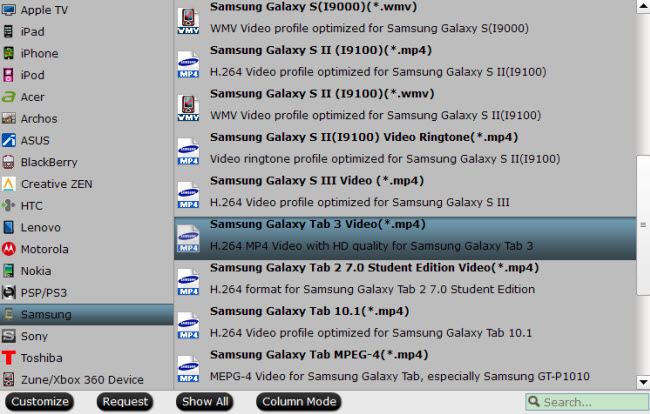
Samsung Galaxy Tab PRO 8.4 is a part of Samsung’s new business-orientated tablet line and a direct rival to the iPad mini 2. With a stunning 2560 x 1600 pixel resolution display, the smallest of the three new Tab PRO models pairs its premium specs sheet with the company’s new Magazine UX interface. The tablet is also available in 10.1 and 12.2-inch forms.With all these specs, I believe it would be great fun to enjoy DVD VOB videos on Galaxy TabPro 8.4. But how? This DVD VOB to Galaxy Converter is just designed to help you play DVD VOB on Galaxy TabPro 8.4. With clean and simple interface, fast conversion speed and good video quality, it will become your most reliable DVD VOB converting assistant. (Read review) Tips: 1. Reach the Mac version here: DVD VOB to Galaxy Converter for Mac; 2. Blu-rays are also supported; see this guide:How to convert Blu-ray to Galaxy TabPro 8.4 Tutorial: How to convert DVD VOB files to Galaxy TabPro 8.4-inch Step 1. Run Pavtube Video Converter Ultimate, as the DVD VOB to Galaxy Converter. Click "Add video" to import DVD VOB files. It will recognize DVD discs from ROM, DVD ISO/IFO and DVD folders automatically. 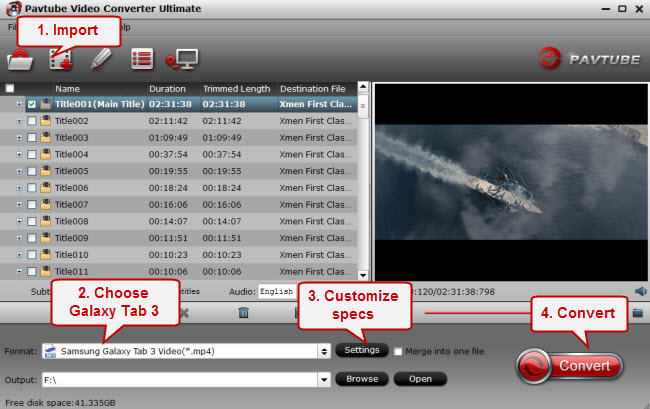 Step 2. Choose Samsung Galaxy TabPro 8.4 compatible format. Click Format drop-down list to locate all the profile; choose "Samsung -> Samsung Galaxy Tab 3 Video(*.mp4)" as the most compatible MP4 preset.
 Step 3. Customize video specs.(Optional). Click "Settings" and you can free change the video size, frame rate, bitrate and other settings. If you think this step is a little troublesome, you can totally skip it, because the default settings will guarantee a well playback quality on your Tab slate. Step 4. Converting DVD VOB to Galaxy TabPro 8.4. Now hit the big "Convert" to start conversion to Galaxy TabPro 8.4. Wait for some moments, then click "Open output folder" to quick locate the converted MP4 file and transfer to Galaxy Tab Pro 8.4 for playback. More Creating 3D Blu-ray movies to view in Oculus Rift DK2 via Mac El Capitan How to Stream and Play Video_TS files via Apple TV 3 Play 4K/HD Videos and Movies to Surface Hub Tablet on Windows 10 Compress Audio files for Saving Space on Your Computer/Device/Web Convert 3D Blu-ray to SBS MKV into hard drive and playback via Plex Convert and Play downloaded 3D Movies on 3D TV Enjoy 3D MKV movies on Smart TV/LED TV/LCD TV via USB Src Watch DVD VOB files on Galaxy TabPro 8.4 with best video
With Pavtube Blu-ray/DVD/Video tools in hand, you will get no difficulty to make a full disc copy or the main movie copy of the original 2D/3D Blu-ray/DVD disc. Besides that, the program also enables you to rip/convert Blu-ray/DVD disc to various different file format for playing on iPhone/iPad/iPod, Android phone and tablets, Windows phones or tablets, game consoles, HD media players, streaming to Apple TV/Amazon Fire TV/Roku, etc. All of Pavtube Mac version Blu-ray/DVD/Video tools have updated to support the newest Mac OS X El Capitan systems. Good News for DVD/Blu-ray/Video collector!! Pavtube announced an official 2015 Christmas Promotion of its all Blu-ray/DVD/Video Tools for All Facebook Fans. 50% Discount Coupon! Time-Limited! Rush to Buy! Reportedly 5 to 6 times faster than a boatload of its competitors, this Windows-based program is eating up a bigger market share. For video editing amateur, you can effectively convert virtually any file formats including AVI, WMV, MP4, MOV, FLV, VOB, MKV, MKV, MTS, M2TS, Tivo, H.265 in SD, HD, 2K, 4K videos to your desired file formats to import your source video to any popular video editing tool. For camera and camcorder users, you will have a fast and fluid workflow with our program by exporting professional video editing codec such as Apple Prores Codec for Final Cut Pro 6/7/x, Apple Intermediate Codec(AIC) for iMovie/Final Cut Express, DNxHD MOV for Avid Media Composer, After Effects CC/Adobe Premiere Pro/Adobe Premiere Elements/Sony Vegas specially optimized file formats, etc. Tip 1. To reach out to Pavtube's more Christmas Coupons, please go to http://www.multipelife.com/pavtube-2015-christmas-great-promotions Tip 2. There are four main Pavtube products: BDMagic, ByteCopy, DVDAid, Video Converter Ultimate. As their names suggest, they are designed for different purposes. Here is a brief form for you to make the right purchasing choice: Pavtube Softwares Comparison Tip 3. To go deeper in user experience, Pavtube Facebook will offer more coupons with different softwares in future. The list are as follows: Pavtube Facebook Round 1: 50% OFF ByteCopy for All Facebook Fans, Days Pavtube Facebook Round 2: 60% OFF DVD Ripper & Copier on Dec 21, 2015, Only 2 Day Pavtube Facebook Round 3: 50% OFF 50% OFF Video Converter Ultimate/iMedia Converter for Mac on Dec 23, 2015, Only 4 Day Pavtube Facebook Round 4: Only $9.9 Video Converter, HD Video Converter, MTS/M2TS Converter, MXF Converter, ChewTune, MKV Converter, FLV/F4V Converter, DVD Creator or MXF MultiMixer for Mac/Windows, on Dec 28, 2015, Only 3 Day Pavtube Facebook Round 5: 60% OFF BDMagic for Windows, 55% OFF BDMagic for Mac on Dec 31, 2015, Only 1 Day $9.9 Area: In the Christmas promotion, Pavtube also offers a $9.9 area in Facebook. Here, you can get a DVD Creator, Video Converter, MKV Converter, MXF Converter and some other video tools in $9.9. Constantly surprises, quickly order your favorite software to backup, edit and share your favorite Christmas movies, music, and videos. Time-Limited! Action! If you have any problem to buy or use Pavtube, pls feel free to contact dvdwinsupport@pavtube.com (for Windows BD/DVD rippers user), videowinsupport@pavtube.com (for Windows video converters user), dvdmacsupport@pavtube.com (for Mac BD/DVD ripper user), or videomacsupport@pavtube.com (for Mac video converter user). Learn more at https://www.facebook.com/pavtubefans/app/201742856511228/
Summary: This article reveals the fastest and easiest way to convert your "Frozen (2013)" DVD movies to Samsung Galaxy Tab 3 10.1 MP4 for playing on Windows and Mac.
As a big fan of movies, you must have quite a lot of DVD movie discs for enjoying and collecting. For your favorite movies, I don’t think you will watch them only once on your PC, like the hottest "Frozen(2013)" movie. And then, how to put the movies off my DVD disc onto new Galaxy Tab 3 10.1 to take it for playback on the go?
Just like the other tablets, Galaxy Tab 3 10.1 is not equipped with DVD-ROM or DVD Player, so DVD movies cannot be played directly on Galaxy Tab 3 10.1. What should you do when you want to watch your new DVD "Frozen (2013)" with Galaxy Tab 3 10.1? How to get your desired subtitles when enjoying?
The best way is to convert DVD to Galaxy Tab 3 10.1 supported formats like MP4.
Pavtube DVDAid is specialized in ripping DVD including commercial DVD with protections like BD+, region code. What’s more, you do not need to worry about the ripping and converting speed. It is excellent for it and it supports CUDA acceleration technology, which will provide you 6 x faster speeds. Apart from it, it will provide the high quality output files for Galaxy Tab 3 10.1 and many other videos formats. Go to get it and freely enjoy your favorite DVD movies on Galaxy Tab 3 10.1. (Top DVD Ripper Review)
If you are a Mac user, please turn to Pavtube DVDAid for Mac.
Note: If you still have a variety of Blu-ray movies waiting for transferring to Galaxy Tab 3 10.1 for playback, you’d better turn to Pavtube BDMagic or the Mac version BDMagic for Mac). It can rip and convert both DVD and blu-ray disc.
Convert the "Frozen (2013)" DVD movies to play on Galaxy Tab 3 10.1 with subtitles
Firstly get your DVD in your DVD drive and then launch the software to get things ready.
1. Load DVD to Pavtube DVD to Galaxy Tab 3 Ripper.
Click “Import DVD” button on the top left to load the DVD from DVD-ROM, you can also “Load ISO/IFO” or “Load from folder”. It will only take few seconds for ripping and importing DVD and you will be kept informed of timely state with a progress dialogue box.
When it has been imported successfully, you can preview the whole movie.
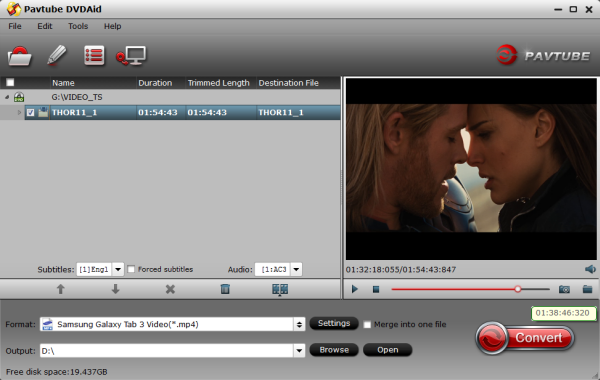 Tip: Select the movie title you want to convert, and preview the file you just selected from the DVD movie in the preview window if you want. Select wanted subtitles and audio track if necessary.
2. Choose Galaxy Tab 3 10.1 friendly format.
Click “Format” menu to find the “Samsung” option in the dropdown list, choose “Samsung Galaxy Tab 3 Video(*.mp4)” for output. It is the most compatible format, which is especially made for Galaxy Tab 3 10.1.
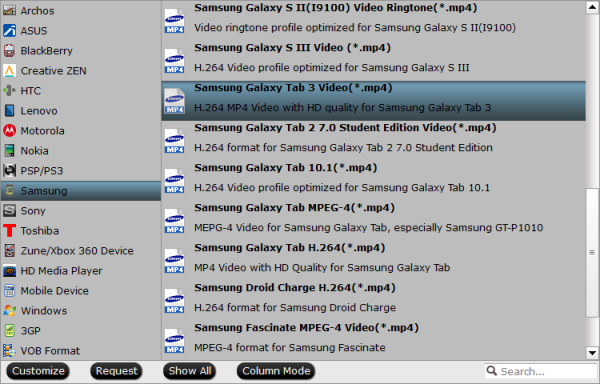 Notes:
a. Output Settings: You can control and adjust the resolutions related to Audio Format, customize Audio Quality and Audio Sample Rate to get your desired video quality and file size;
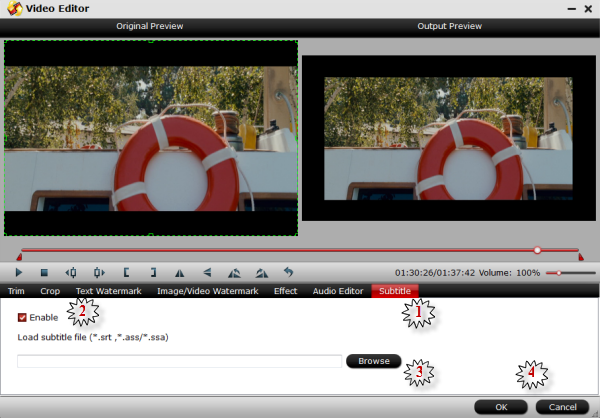
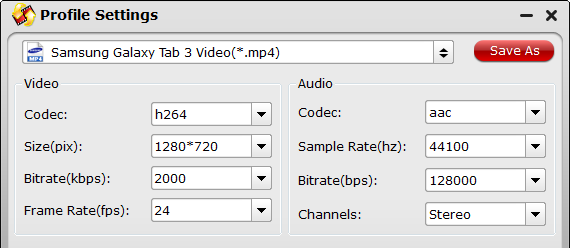 b. Edit the Videos: If you are not pleased with the default effect, simply click the "Edit" button and then it will show you some options:
- Trim - It has got the most powerful function, you could edit the start/end time of the video during the time you like.
- Crop - cut off the DVD clips' black edges and unwanted area easily.
- Watermark - Add different watermark like text, image (including GIF), and video watermark. Its video watermark function will add a picture-in-picture effect to your video.
- Effect - You possibly can adjust the "3D", "Deinterlacing", "brightness", "contrast" and "saturation". As an example, you can put your own icon or picture in the video or press any words on it.
- Subtitle - You can download free *.srt, *.ass and *.ssa subtitle and embed in your video.
 c.Choosing the output folder: During the operation on the UI, you can also define where to place the output converter movie video for your convenience and preference.
3. Convert DVD to Galaxy Tab 3 10.1 MP4.
You can “Browse” your computer to choose a new folder for output file before conversion. When everything is ready, click “Convert” button to start converting DVD to MP4 Galaxy Tab 3 10.1, then “Open” button will show you the location of output files.
Now you can watch "Frozen (2013)" DVD movie on Galaxy Tab 3 10.1 with subtitles anytime and anywhere. Hope it will help you.
More
How to Stream MKV Video to Chromecast for Playback
Get started to Stream Video from PC to Roku using Plex Media Server
Enjoy all high definition media contents on iPhone 6 Plus
Painlessly Convert MKV, AVI, VOB, WMV, Tivo, MP4, FLV Video to iPhone 6 for Enjoying
Play Rented 3D Movies with Apple TV on Mac OS X El Capitan
Stream Videos from NAS to PS3 via DSLR for playback
Which Budget Consumer Virtual Reality Headset Should You Buy?
Convert and Play downloaded 3D Movies on 3D TV
Src
Get "Frozen (2013)" DVD movies playback on Galaxy Tab 3 10.1 with subtitles
Good News for DVD/Blu-ray/Video collector!! Pavtube announced an official 2015 Christmas Promotion of its all Blu-ray/DVD/Video Tools for All Facebook Fans. 50% Discount Coupon! Time-Limited! Rush to Buy! Reportedly 5 to 6 times faster than a boatload of its competitors, this Windows-based program is eating up a bigger market share.  Copy and Backup Blu-ray/DVD With Pavtube Blu-ray/DVD/Video tools in hand, you will get no difficulty to make a full disc copy or the main movie copy of the original 2D/3D Blu-ray/DVD disc. Besides that, the program also enables you to rip/convert Blu-ray/DVD disc to various different file format for playing on iPhone/iPad/iPod, Android phone and tablets, Windows phones or tablets, game consoles, HD media players, streaming to Apple TV/Amazon Fire TV/Roku, etc. All of Pavtube Mac version Blu-ray/DVD/Video tools have updated to support the newest Mac OS X El Capitan systems. Play and edit videos For video editing amateur, you can effectively convert virtually any file formats including AVI, WMV, MP4, MOV, FLV, VOB, MKV, MKV, MTS, M2TS, Tivo, H.265 in SD, HD, 2K, 4K videos to your desired file formats to import your source video to any popular video editing tool. For camera and camcorder users, you will have a fast and fluid workflow with our program by exporting professional video editing codec such as Apple Prores Codec for Final Cut Pro 6/7/x, Apple Intermediate Codec(AIC) for iMovie/Final Cut Express, DNxHD MOV for Avid Media Composer, After Effects CC/Adobe Premiere Pro/Adobe Premiere Elements/Sony Vegas specially optimized file formats, etc. Tip 1. To reach out to Pavtube's more Christmas Coupons, please go to http://www.multipelife.com/pavtube-2015-christmas-great-promotions Tip 2. There are four main Pavtube products: BDMagic, ByteCopy, DVDAid, Video Converter Ultimate. As their names suggest, they are designed for different purposes. Here is a brief form for you to make the right purchasing choice: Pavtube Softwares Comparison Tip 3. To go deeper in user experience, Pavtube Facebook will offer more coupons with different softwares in future. The list are as follows: Pavtube Facebook Round 1: 50% OFF ByteCopy for All Facebook Fans, Days Pavtube Facebook Round 2: 60% OFF DVD Ripper & Copier on Dec 21, 2015, Only 2 Day Pavtube Facebook Round 3: 50% OFF 50% OFF Video Converter Ultimate/iMedia Converter for Mac on Dec 23, 2015, Only 4 Day Pavtube Facebook Round 4: Only $9.9 Video Converter, HD Video Converter, MTS/M2TS Converter, MXF Converter, ChewTune, MKV Converter, FLV/F4V Converter, DVD Creator or MXF MultiMixer for Mac/Windows, on Dec 28, 2015, Only 3 Day Pavtube Facebook Round 5: 60% OFF BDMagic for Windows, 55% OFF BDMagic for Mac on Dec 31, 2015, Only 1 Day Constantly surprises, quickly order your favorite software to backup, edit and share your favorite Christmas movies, music, and videos. Time-Limited! Action! If you have any problem to buy or use Pavtube, pls feel free to contact dvdwinsupport@pavtube.com (for Windows BD/DVD rippers user), videowinsupport@pavtube.com (for Windows video converters user), dvdmacsupport@pavtube.com (for Mac BD/DVD ripper user), or videomacsupport@pavtube.com (for Mac video converter user). Learn more at https://www.facebook.com/pavtubefans/app/201742856511228/
